SMS / Text Message Opt-In Policy
Tip Share Pro LLC · www.tipsharepro.com
What TipSharePro texts are
TipSharePro is restaurant tip-distribution software used by restaurant owners and managers. Text messages are sent only to a restaurant's own employees and contain work-related tip information — for example, an employee's own tip totals, or a notice that the restaurant's tip-share settings are changing. TipSharePro never sends marketing or promotional text messages, and never texts anyone who is not an employee of a TipSharePro customer.
Sample message:
“TipSharePro – Jose's Kitchen, Year to Date 2026: you contributed $412.50 and your tip share is $1,204.75. If a number looks wrong, tell your manager right away. Reply STOP to opt out.”
How consent (opt-in) is collected — double opt-in
Consent is given by the employee, from the employee's own phone, using a two-step (double opt-in) process:
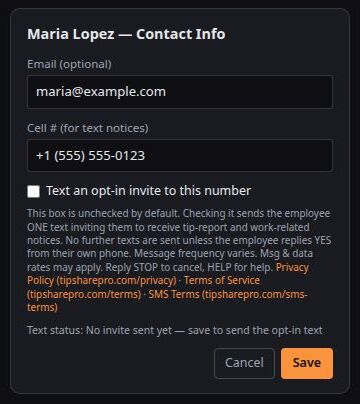
- Step 1 — Invitation. A manager enters the employee's cell number on the employee's contact card and checks “Text an opt-in invite to this number”. TipSharePro then sends the employee a single invitation text:
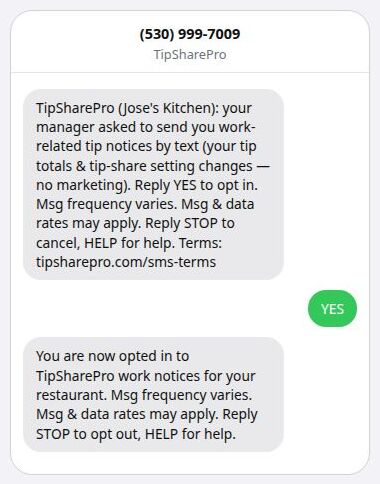
“TipSharePro (Restaurant Name): your manager asked to send you work-related tip notices by text (your tip totals & tip-share setting changes — no marketing). Reply YES to opt in. Msg frequency varies. Msg & data rates may apply. Reply STOP to cancel, HELP for help. Terms: tipsharepro.com/sms-terms”
- Step 2 — Employee confirmation. The employee must reply YES (or START) from their own phone. Only after that reply does TipSharePro record consent and send an enrollment confirmation:
“You are now opted in to TipSharePro work notices for your restaurant. Msg frequency varies. Msg & data rates may apply. Reply STOP to opt out, HELP for help.”
Screenshots of the consent flow
Screenshot 1 — where the opt-in begins (inside the TipSharePro app, behind login). The manager sees this contact card. The checkbox is unchecked by default — nothing is pre-selected — and the disclosure text under it, including links to the Privacy Policy, Terms of Service, and SMS Terms, is shown before anything is sent:
Screenshot 2 — what the employee sees on their own phone. The single invitation text with all disclosures, the employee's own YES reply, and the enrollment confirmation:
No tip notices are ever sent to an employee who has not personally replied YES. Consent cannot be given by a manager or anyone else on the employee's behalf, is never a condition of employment, and applies only to the work-notice messages described above.
Message frequency and rates
Message frequency varies with the restaurant's pay schedule — typically a few messages per pay period. Message and data rates may apply according to the employee's mobile plan.
Opting out
Reply STOP to any TipSharePro text to stop receiving messages. Reply HELP for help. An employee can also ask their manager to uncheck the texting box on their contact card at any time, which stops all texts to their number. An employee who replied STOP can rejoin only by texting START from their own phone.
Privacy
Phone numbers are used only to deliver the work-related messages described above. TipSharePro does not sell or share mobile numbers or opt-in data with third parties for marketing purposes. Text messaging originator opt-in data and consent are not shared with any third parties.
Policies
Privacy Policy: https://tipsharepro.com/privacy
Terms of Service: https://tipsharepro.com/terms
SMS Terms & Conditions: https://tipsharepro.com/sms-terms
Questions? Contact your manager, or Tip Share Pro LLC via www.tipsharepro.com.